

- Listing & selecting vehicles from the fleet (the dropdown and the fleet dialog).
- The
DroneServiceaction surface — the flat REST facade every component calls to CRUD drones and issue flight/mission/geofence/param/video actions. - The telemetry HUD — the five status tags (system state, GPS/RTK fix, mode, altitude, battery) rendered by
DroneStatusComponent. - Selected-drone propagation — how a selection made anywhere fans out to every component and back-end subscription without infinite loops.
This page is about fleet state and the action facade. The transports underneath are documented elsewhere: the Socket.IO telemetry stream that feeds the HUD is in Real-time Telemetry Client; the gateway endpoints these actions hit are in Drone Management & Control Actions; manual/gamepad control is in Vehicle Commands & Gamepad.
The players
| Piece | File | Responsibility |
|---|---|---|
DroneStatusComponent | src/app/home/drone-status/drone-status.component.ts | Telemetry HUD tags + the vehicle-select dropdown; wires all telemetry subscriptions on selection. |
DroneService | src/app/services/drone-service/drone.service.ts | Flat REST facade for drone CRUD + every /drone/action/* command, video rooms, VPN, params, WireGuard status. |
DroneSubscriptionService | src/app/services/drone-subscription.service.ts | Cached fleet list + a keyed Subject registry (currentDroneList, selectedDrone) shared across components without prop drilling. |
AppStateService | src/app/services/app-state.service.ts | Owns selectedDrone$ and persists the selection to localStorage. |
CreateDroneDialogComponent | src/app/home/dialogs/create-drone-dialog/create-drone-dialog.component.ts | The Add Vehicle / edit form. |
ListDronesDialogComponent | src/app/home/dialogs/list-drones-dialog/list-drones-dialog.component.ts | Fleet manager: per-vehicle status, video, dock, params, restart, edit/delete menus. |
Drone model (src/app/models/drone.model.ts) is the shared shape everywhere:
src/app/models/drone.model.ts
Listing & selecting drones
The fleet list is fetched once and cached inDroneSubscriptionService, so multiple components (the status dropdown, the fleet dialog, HomeComponent) share a single copy.
Load the fleet
DroneStatusComponent.ngAfterViewInit() only fetches if the cache is empty (droneSubscriptionService.hasDroneList()); otherwise it reuses the cached list. getDroneList() calls DroneService.getDrones() → GET /drones and pushes the result into droneSubscriptionService.setCurrentDroneList(...).Display-name truncation
Vehicle names are split on
_ and, when there are 4+ parts, only parts[3:] are kept for display (drone-status.component.ts:95-99). This hides the internal SKYHUB_SITL_<n>_...-style prefixes. Note this mutates drone.name in place on the shared list object.Select via the dropdown
The PrimeNG dropdown is bound
[(ngModel)]="selectedDrone" with optionLabel="name" and [showClear]="true". Picking a vehicle fires onChange($event.value, true) — the true marks it as a user interaction.The fleet dialog
ListDronesDialogComponent (app-list-drones-dialog) is the richer manager surface. It re-fetches drones, then computes a per-vehicle status with fetchDroneStatuses():
type === 'sitl'→ alwaysOnline.- Has an
activation_token→Pending Activation(a physical drone that has not yet calledGET /drone/activateon the gateway). - Otherwise →
getVPNStatus(id)(GET /drone/{id}/vpn/status); truthystatus→Online, elseOffline.
websocketService.diagnosticsSubject and reading the Mode value out of the MAVROS Heartbeat diagnostic. Its context menus expose dock start/stop, takeoff, motor test, toggle lights, video start/stop/restart, camera focus, restart vehicle / flight controller, charging on/off, edit, delete, and view — most routed through confirmation dialogs in AppStateService.
Some fleet actions in the dialog are not
DroneService REST calls. Restart, charging, and camera-focus commands are pushed as system_command / charging_control / camera_command payloads through appStateService.setControllerData(...), which travels the low-latency redispad WebSocket path — see Vehicle Commands & Gamepad.Selected-drone propagation
A selection can originate from three places, and all three must converge on one source of truth without looping.DroneStatusComponent subscribes to all three and de-dupes by object identity:
The fromUserInteraction flag is the loop-breaker. onChange(drone, fromUserInteraction):
- Always tears down the previous telemetry subscriptions (
diagnostics,gps,gpsRaw,relAlt) and callswebsocketService.killAllActiveEventSource(), then clears the HUD fields. - Always re-subscribes for the new drone:
websocketService.getAllData(drone.id)(thedashboardstream) plus the four subject subscriptions. - Only when
fromUserInteraction === truewrites back toappStateService.setSelectedDrone(drone)anddroneSubscriptionService.setValue('selectedDrone', drone).
onChange(drone, false), a selection that arrives from a service never writes back to that service — that is what prevents the circular dispatch. HomeComponent independently subscribes to appStateService.selectedDrone$ to drive the map / 3D marker (home.component.ts:268).
Adding a vehicle
The Add Vehicle dialog (CreateDroneDialogComponent, shown from HomeComponent.editDrone() / app-create-drone-dialog) is deliberately minimal — only Name, Type, and Vehicle Type are surfaced:
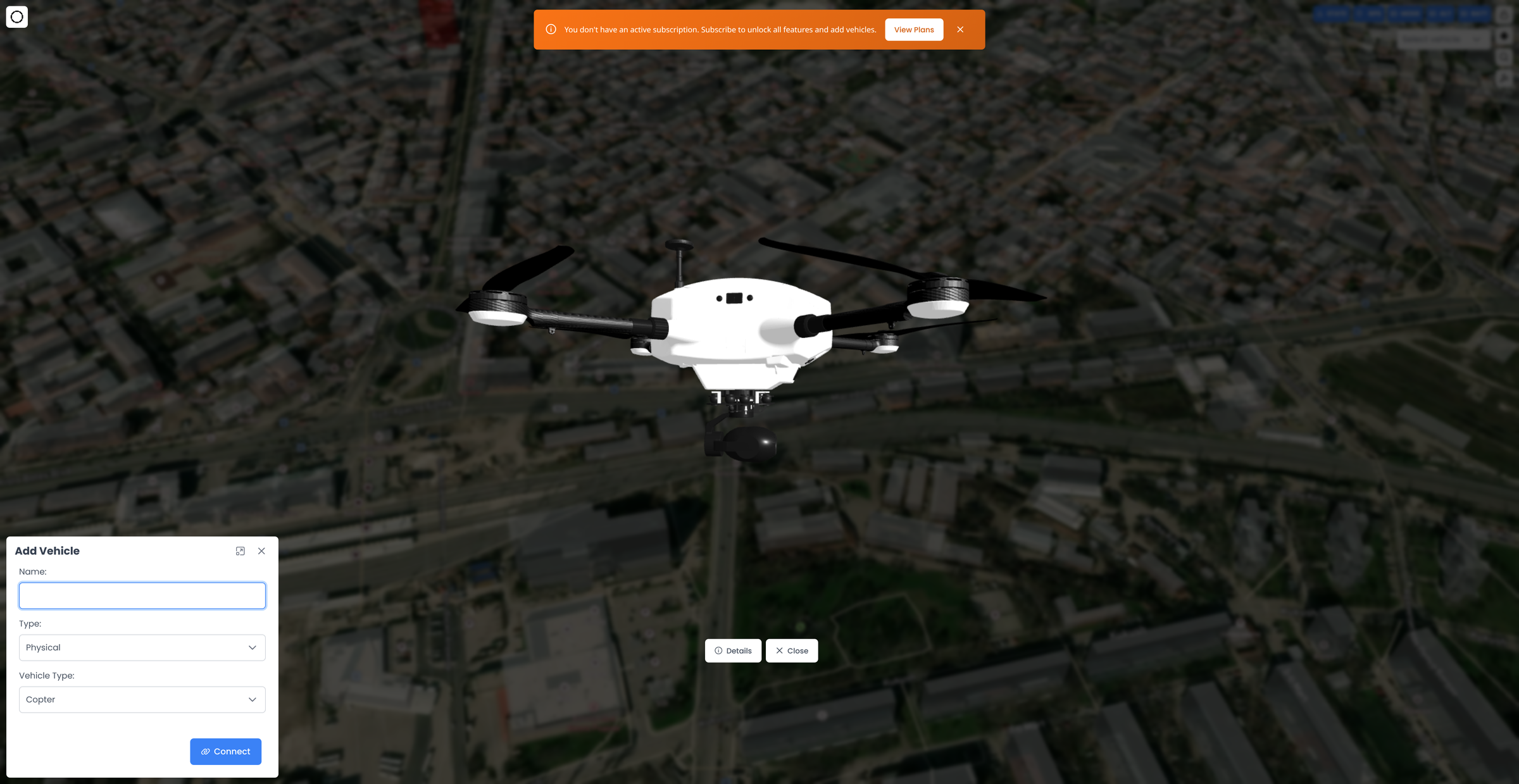
- Type:
Physical(physical) orSimulated(sitl).typeChange()disables theip/portcontrols for SITL, since simulated containers are spawned by the gateway (theirip/mac/portare assigned server-side — see SITL Drone Lifecycle). - Vehicle Type:
RoverorCopter— drives control/axis mappings downstream.
create-drone-dialog.component.ts):
Free-tier limit check (create only)
If the user has no subscription,
onSave() calls getDrones() first; if they already own 1 or more vehicles it opens app-subscription-dialog instead of creating. Editing skips this.POST the drone
proceedWithSave() calls DroneService.createDrone(drone) → POST /drone (or updateDrone → PUT /drone/{id} when editing). A loading dialog shows “Creating Simulated Vehicle…” for SITL vs “Creating vehicle…” otherwise.Handle billing rejection
A
402 response with reason of no_subscription, subscription_inactive, or vehicle_limit_reached re-opens the subscription dialog. The backend is the real enforcement point; the client-side count check is a shortcut. See Stripe Billing & Vehicle Limits.DroneService action surface
DroneService is a thin, providedIn-root HTTP facade — no state, one method per gateway endpoint. All URLs are prefixed with environment.url (the …/api/v1 base). The AuthInterceptor attaches the Bearer JWT (see Auth: Guard, Interceptor & AuthService).
- CRUD
- Flight actions
- Mission & geofence
- Params / video / VPN
| Method | HTTP | Body / notes |
|---|---|---|
getDrones() | GET /drones | Returns Drone[]. |
createDrone(drone) | POST /drone | Full Drone payload. |
updateDrone(drone) | PUT /drone/{id} | — |
deleteDrone(droneId) | DELETE /drone/{id} | — |
The telemetry HUD
DroneStatusComponent renders five PrimeNG tags above the dropdown. Each is fed by a distinct telemetry subject on WebsocketService, filtered to the selected drone. All five tags show placeholder text (STATE/GPS/MODE/ALT/BATT) when no drone is selected. While isLoading, the System-state tag shows Loading... and the other four (GPS/MODE/ALT/BATT) show ---.
What each subject provides
| Subject | Source topic | HUD fields |
|---|---|---|
diagnosticsSubject | /diagnostics | battery/voltage/current (from mavros: Battery), mode + systemStatus (from Heartbeat via getMode), gpsStatus + gpsSatellitesCount (from mavros: GPS). |
gpsRawSubject | GPS_RAW | gpsFixType + isRtkFix from fix_type. |
relAltSubject | /mavros/global_position/rel_alt | alt — relative altitude (AGL, height above home/takeoff). |
gpsSubject | /mavros/global_position/global | gpsAltitude — absolute altitude (MSL) + gpsAccuracy derived from position covariance. |
GPS / RTK fix mapping
gpsRawSubject carries the MAVLink GPS_RAW fix_type. getGpsRawData() maps it to a label and an isRtkFix flag that drives tag color:
fix_type | gpsFixType | isRtkFix | HUD severity |
|---|---|---|---|
| 6 | RTK Fixed | ✅ | success (green) |
| 5 | RTK Float | ✅ | success (green) |
| 4 | DGPS | — | warning |
| 3 | 3D Fix | — | warning |
| 2 | 2D Fix | — | danger |
| 1 | No Fix | — | danger |
| 0 | No GPS | — | danger |
getGpsSeverity() returns success for any RTK fix, warning for 3d fix/dgps/sbas, otherwise danger. The GPS tag text is (gpsFixType || gpsStatus) + ' ' + gpsSatellitesCount.
Altitude: MSL vs AGL
The HUD deliberately tracks two altitudes:alt— relative altitude fromrelAltSubject, i.e. AGL height above the home/takeoff point. This is what theALTtag shows (alt <n>M) and whatappStateService.altitudeis set to.gpsAltitude— absolute MSL altitude fromgpsSubject.
ground elevation = gpsAltitude − alt (MSL below the vehicle). Keep the MSL-vs-AGL distinction — conflating them would put the drone marker at the wrong height and break the ground-elevation readout.
Other tag logic
- System state —
systemStatus === 'ACTIVE'rendersARMED(green); anything else rendersDISSARMED(red — the literal string is misspelled in the template).systemStatuscomes from the HeartbeatSystem statusdiagnostic. - Mode —
MANUAL/LOITER/LOYTER/POSHOLDarewarning,GUIDEDisinfo, everything elsesuccess.MODE_DESCRIPTIONSprovides tooltip text. - Battery —
≤ 0or< 10%→ danger,< 30%→ warning, else success. Tooltip adds voltage/current and a Good/Low/Critical health line.
Tooltip caching is a performance guard, not decoration. The
getXxxTooltip() / getGpsSeverity() getters are bound in the template, so Angular calls them on every change-detection pass. invalidateTooltipCacheIfStale() compares a snapshot of all telemetry fields and only recomputes the memoized strings when something actually changed, avoiding per-pass string/array allocations at telemetry frequency. Preserve this when adding a tag.Gotchas to preserve
getAllDatais the only live path. The HUD subscribes viagetAllData(id)→ thedashboardstream.getGpsData()/getLogsData()(single-stream subscriptions) exist but the gateway only delivers data on thedashboardroom — treat them as effectively dead. Details in Real-time Telemetry Client.- Selection teardown is mandatory.
onChange()unsubscribes the four subjects and callskillAllActiveEventSource()before re-subscribing. Skipping teardown leaks subscriptions and mixes telemetry from the previous drone into the new HUD. - Name mutation. The
parts.slice(3)truncation rewritesdrone.nameon the shared cached object, so downstream consumers see the shortened name too. localStorageis the persistence layer. Selection survives reloads viaselected_drone_id; a stale id (deleted drone) is cleared on next fleet load.- Client-side vehicle-limit check is advisory. The real free-tier / subscription enforcement is the gateway
402response; keep both in sync but trust the backend.