

Connection Steps
- Pair the controller to the phone, tablet, or PC
- Test that the gamepad is detected at hardwaretester.com/gamepad
- Log in to SkyHub: https://skyhub.ai
- Select a vehicle in the web interface and press any gamepad button to connect. A WebSocket connection is established to the selected drone.
- Enter MANUAL/LOITER mode for vehicle control.
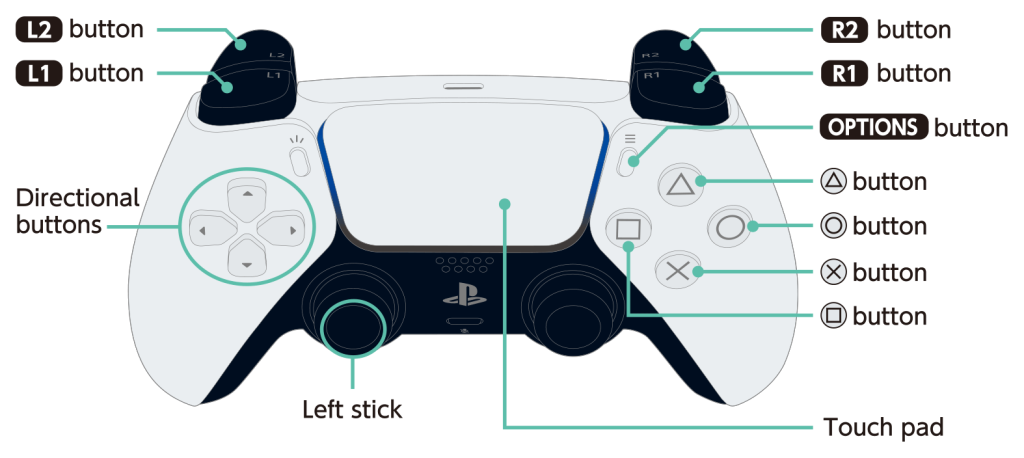
Button Mappings for Rover
| Control | Action |
|---|---|
| Triangle (△) | Guided Mode |
| Circle (○) | Auto Mode |
| Cross (×) | Lights |
| Square (□) | Manual Mode |
| Up / Down / Left / Right | Camera gimbal |
| L1 | Take Photo |
| R1 | Toggle Recording Video |
| L2 | Throttle Backward |
| R2 | Throttle Forward |
| Left Stick | Left / Right |
| Right Stick | Nothing |
| Right Options | Arm / Disarm |
| Left Options | Camera point forward |
Button Mappings for Drone
| Control | Action |
|---|---|
| Triangle (△) | Guided Mode |
| Circle (○) | Auto Mode |
| Cross (×) | Nothing |
| Square (□) | Loiter Mode |
| Up / Down / Left / Right | Camera gimbal |
| L1 | Take Photo |
| R1 | Toggle Recording Video |
| L2 | Nothing |
| R2 | Nothing |
| Left Stick | Throttle Control |
| Right Stick | Attitude Control |
| Right Options | Arm / Disarm |
| Left Options | Camera point forward |